

This guide walks you through publishing a BIMI DNS TXT record that uses the logo and certificate SSL.com hosts for you on bimi.ssl.com.
Before you start
- An issued Mark Certificate (VMC, CMC, or GMC) from SSL.com.
- DMARC at enforcement. Your domain’s DMARC policy must be p=quarantine or p=reject. The policy must apply to all mail (pct=100 or no pct tag), and a subdomain policy (sp=), if present, must not be none. BIMI logos are not shown for domains at p=none.
- Access to your domain’s DNS, or someone who can add records for you.
Step 1: Copy your hosted URLs and prepared record
- Sign in to your SSL.com account and click Orders. Find your Mark Certificate order and click download.

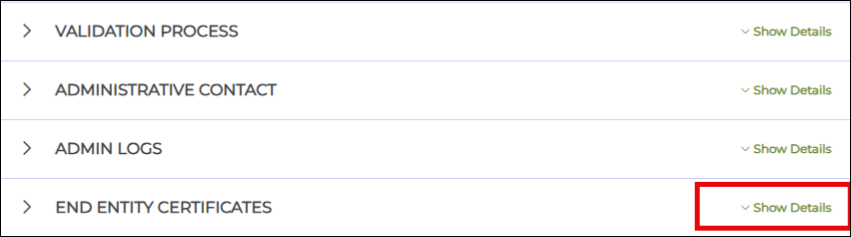
- Under END ENTITY CERTIFICATES, click Show Details.
- In BIMI DNS SETUP, copy the Host, Type, and Value of the prepared TXT record.
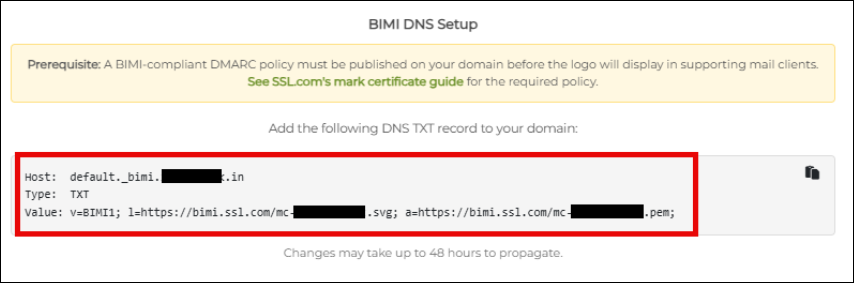


The same details are in your issuance email.
The Host shown in your account is the full name, such as default._bimi.yourdomain.com. Read the Host note in Step 3 before you paste it. If your certificate covers more than one domain, your account shows a record for each domain. Add each record.
Step 2: Know the record fields
|
Field |
Value |
|
Type |
TXT |
|
Host / Name |
default._bimi (full name: default._bimi.yourdomain.com) |
|
Value (VMC, CMC, GMC) |
v=BIMI1; l=https://bimi.ssl.com/mc-{ref}.svg; a=https://bimi.ssl.com/mc-{ref}.pem; |
|
TTL |
3600 seconds (1 hour) |
Formatting tips:
- Use a semicolon after each tag and a space before the next one.
- The logo tag is a lowercase L (l=), not the number 1 or a capital I.
- Use the full https:// URLs exactly as shown in your account.
- Replace any existing default._bimi record. Don’t keep two.
Step 3: Add the record at your DNS provider
The steps are similar everywhere: open your domain’s DNS records, add a TXT record, and paste the values. Field names vary by provider.
Watch the Host field. Most providers add your domain automatically. If you enter default._bimi.yourdomain.com in a provider that appends the domain, the record ends up at default._bimi.yourdomain.com.yourdomain.com. Enter default._bimi unless your provider asks for the full name.
|
Provider |
Where to add the record |
Host value to enter |
|
Cloudflare |
Your domain › DNS › Records › Add record › Type TXT |
default._bimi |
|
GoDaddy |
My Products › your domain › DNS › Add New Record › Type TXT |
default._bimi |
|
Amazon Route 53 |
Hosted zones › your domain › Create record › Record type TXT |
default._bimi (record name field) |
|
Google Cloud DNS |
Cloud DNS › your zone › Add standard › Resource record type TXT |
default._bimi |
|
Microsoft Azure DNS |
Your DNS zone › Record sets › Add › Type TXT |
default._bimi |
Some providers, such as Amazon Route 53, need the value wrapped in double quotes. If your provider has a TXT length limit, it will usually split long values into multiple strings for you; that is valid for BIMI.
Step 4: Check that the record resolves
DNS changes can take up to 48 hours to reach everyone, though they are often visible within minutes.
Look up the record from the command line:
dig TXT default._bimi.yourdomain.com +short
On Windows:
nslookup –type=TXT default._bimi.yourdomain.com
The result should show your v=BIMI1 record with the bimi.ssl.com URLs.
Step 5: Check that the record points to the hosted files
Confirm that the URLs in the record load:
curl -I https://bimi.ssl.com/mc-a1b2c3d4.svg
curl -I https://bimi.ssl.com/mc-a1b2c3d4.pem
Both should return status 200. A 403 (Access Denied) usually means the URL was copied incorrectly. bimi.ssl.com returns 403, not 404, when no file exists at the URL. See the troubleshooting section of the BIMI SVG CDN Hosting FAQ.
Step 6: Run a BIMI check and send a test email
- Check your domain with the BIMI Group’s BIMI checker. It confirms that the record is published, the logo is valid, and the certificate is readable.
- Send a test email straight to a Gmail or Yahoo Mail address, without forwarding or relays.
- Open the message. When your logo appears next to the sender name, setup is complete.
Mailbox providers cache BIMI results, so a logo can take a while to appear even when every check passes.