

To maintain uninterrupted service, certificates must be renewed before expiration. Failure to renew a certificate in time can result in service outages, browser security warnings, and loss of user trust.
For organizations managing large certificate inventories, manual renewal can increase operational overhead and the risk of missed expirations. To reduce this risk, SSL.com enables automatic renewal by default. This ensures certificates are reissued before they expire, helping prevent service disruptions.
If automatic renewal does not align with your operational requirements, you can disable this setting at an account level by following the steps outlined in this guide.
Note: If you only need to disable auto-renewal for a single certificate, please refer to this other guide: How to Disable Auto-Renew for Single Order.
Prerequisites
- An active SSL.com account
Procedure
- Sign in to your SSL.com account.
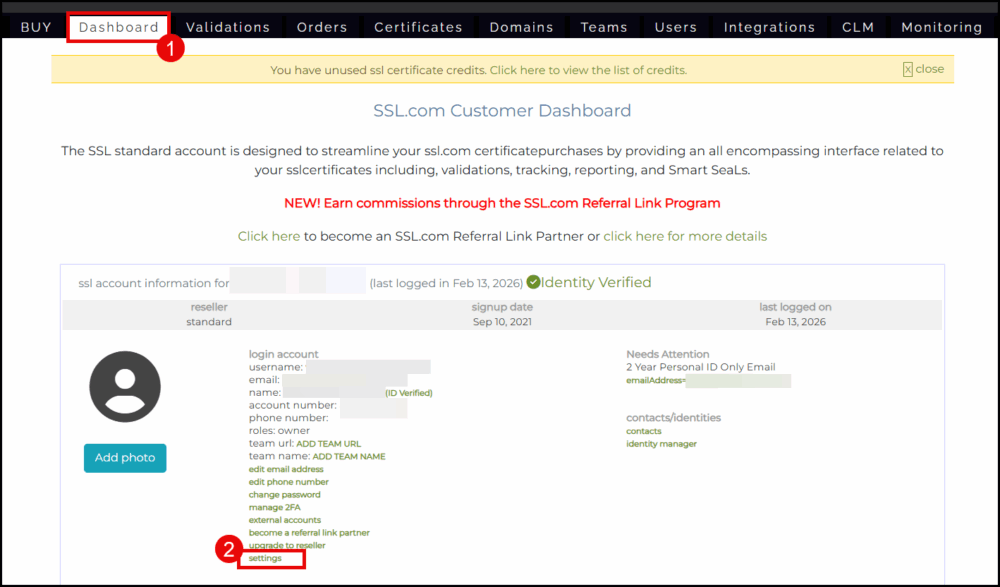
- From the main navigation menu, select Dashboard. Next, click settings to open the Account Settings page.
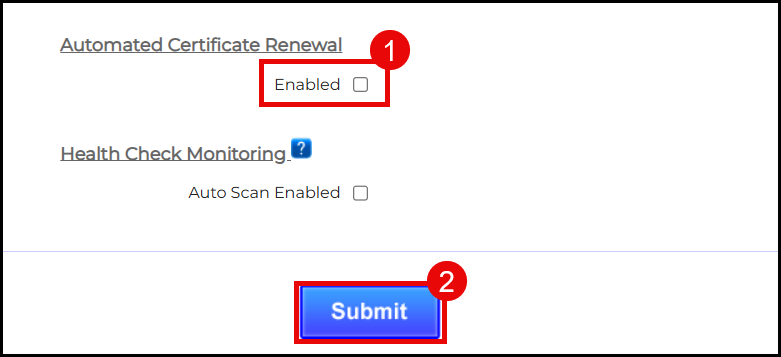
- Scroll to the Automated Certificate Renewal section. Clear the Enabled checkbox. Finally, click the Submit button to apply the changes.


Verification
After submitting the change, a confirmation message will appear indicating that automatic renewal has been disabled. You can revisit the Automated Certificate Renewal section to confirm that the setting remains unchecked.


Additional Support
If you need assistance, click the chat icon located in the lower-right corner of the SSL.com website to contact a support representative.